

Managing change requests can feel like herding cats — multiple stakeholders, shifting priorities, and the constant risk of something slipping through the cracks. That’s where a well‑designed workflow becomes your secret weapon. In this guide, we’ll take a clean, visual BPMN process map and bring it to life inside Znuny, the open‑source ticketing powerhouse. You’ll see exactly how to turn decision points into automated transitions, keep every step accountable, and make sure no request dies in someone’s inbox. By the end, you’ll have a repeatable, auditable process that your team can follow without missing a beat.
This process is a very basic change request process, which includes event signals for cancelling the process.
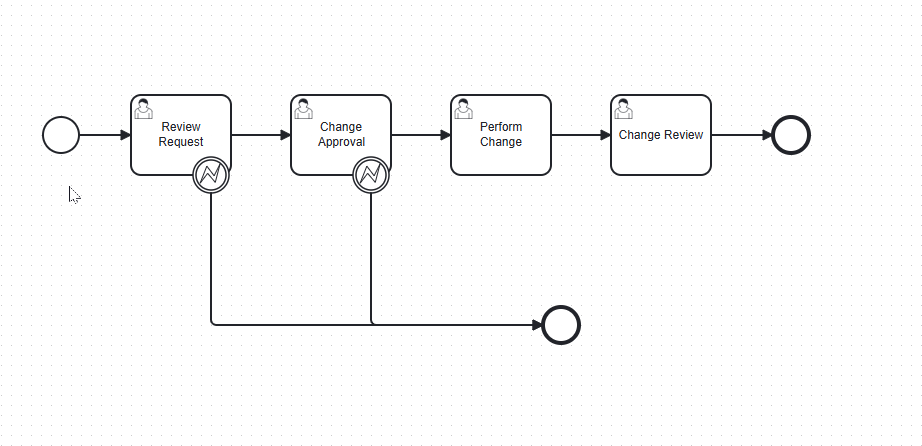
Here’s how you could implement it step‑by‑step:
1️⃣ Map BPMN Steps to Znuny Process Elements
Your diagram has:
- Review Request → User Task 1
- Change Approval → User Task 2
- Perform Change → User Task 3
- Change Review → User Task 4
In Znuny, these become Process Activities with Activity Dialogs for the agent to fill in.
2️⃣ Create the Process in the Admin Interface
- Go to Admin → Process Management → Process Configuration.
- Create a new process called Change Request Workflow.
- Define Activities for each BPMN task:
Review RequestChange ApprovalPerform ChangeChange Review
3️⃣ Define Activity Dialogs (Forms)
For each activity, create an Activity Dialog that contains the fields the agent needs at that step:
- Review Request: Change description, requester, priority.
- Change Approval: Approve/Reject radio button, comments.
- Perform Change: Implementation notes, completion date.
- Change Review: QA checklist, final sign‑off.
4️⃣ Model the Boundary Events (Decision Points)
Your BPMN has two Boundary Events:
- During Review Request: Request data change can continue to Change Approval or end the process.
- During Change Approval: Request data change can continue to Perform Change or end process.
In Znuny, you handle this with Transitions and Transition Actions:
- Create transitions like:
Needs Approval→ goes to Change ApprovalReject Request→ goes to EndApproved→ goes to Perform ChangeRejected→ goes to End
- Use Transition Actions to set ticket states (e.g.,
closed successful,closed unsuccessful) when ending. -
Use a dynamic field to represent the change status.
5️⃣ Set Ticket States and Queues
- Create queues for each stage if you want work to be routed to different teams (e.g.,
Change Review Queue). - Define states like:
pending approvalwork in progresspending reviewclosed successfulclosed unsuccessful
6️⃣ Add Automation
- Use GenericAgent jobs to escalate overdue approvals or changes.
- Use Notifications to alert the right people when a ticket enters a new activity.
7️⃣ Test the Workflow
- Create a dummy change request ticket.
- Walk it through each step to ensure transitions, forms, and notifications work as intended.
- Adjust transitions or dialogs if agents need more/less information.
✅ Result: You’ll have a guided, clickable workflow in Znuny that mirrors your BPMN diagram — agents will only see the fields and actions relevant to their current step, and decision points will automatically route the ticket to the right next stage or close it.
- Blogpost