
In the upcoming Znuny Version 6.3, you're able to format statistics individually, based upon your needs.
Key Features
Worksheet Name
- Name the worksheet.
Freeze Panes
- Set the row and column at which to freeze the panes.
Last Row
- Format the totals row.
Column Width
- Format the total column.
Text Formatting
- Adjust many text properties.
Cell Formatting
- Adjust many cell properties.
Border Formatting
- Adjust border properties.
Formatting Highlights
✔️ Ticket Numbers - Numbers are shown as and treated as numbers. No ticket numbers in scientific notation.
✔️ Number Formatting - Easily change the format of a number to adjust reports for European and U.S. Numbering Formats and Currency
Automatic Data Type Detection (per cell)
Proper data formatting for the following cells is now automatic.
✔️ URL
✔️ String
✔️ DateTime
✔️ Number
An Example
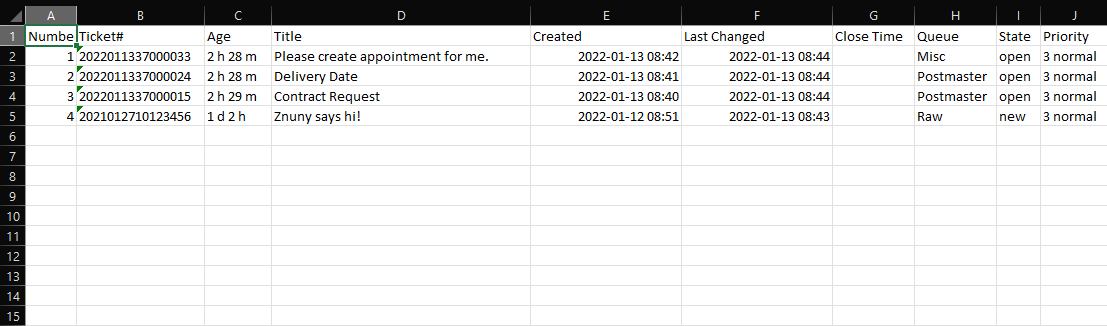
A standard Excel report in Znuny looks similar to this:
Using the available formatting options in 6.3, you can quickly go from Excel to Excel(lent).
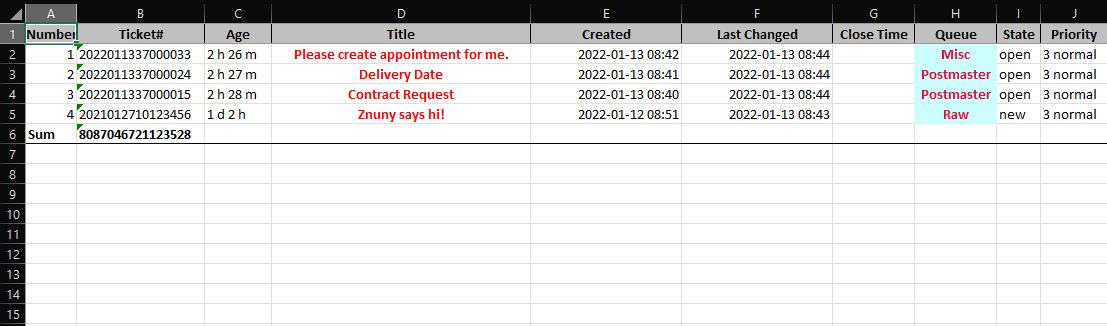
Options
You can layer your report formatting to have a default look and feel. Additionally, you can modify each report individually to create a cascading style.
Get an Early Look
Znuny is free and open source. Get a sneak-peek and check out the source code to set up a bleeding-edge copy of Znuny directly from the development branch. An example file is ready to use, no extra configuration neccessary. Don't forget to install Hash::Merge! Have a great day. We'll be releasing more highlights soon.